· 11 min read
Why React re-renders: reconciliation, keys, memo and signals
- React
- Frontend
- Performance
- State management
Contents · 11 sections
Most React performance advice comes down to “avoid unnecessary re-renders”, but it rarely explains what a re-render is, why React does so many of them, or why most of them don’t matter. React’s behaviour follows from one simple rule, and once you know it, you can predict which components will run, fix the slow cases by rearranging components rather than sprinkling memo everywhere, and see why other frameworks made a different choice.
This article covers what rendering means in React, the three reasons a component renders, how React decides what to keep and what to throw away, why keys matter more than they look, the structural fixes that beat memoisation, context and stores, and signals, the model used by Solid, Vue, Svelte and Angular. How the browser turns DOM changes into pixels is a separate step, covered in the article on the rendering pipeline.
What a render is, and what it isn’t
In React, to render a component means to call the component function. It returns a description of what the UI should look like: plain objects saying “a div with this class, containing this button”. Rendering doesn’t touch the page. After rendering, React compares the new description with the previous one and changes only the parts of the real DOM that differ. That second step is the commit.
This split explains why re-renders are usually cheap. A component that re-renders and returns exactly the same description as before costs a function call and a comparison; the page is untouched. A render becomes expensive only when the function itself does a lot of work, such as filtering ten thousand items, or when there are so many components rendering that even cheap calls add up, as when every keystroke re-renders a large table.
Why a component renders
A component renders again for one of three reasons:
- Its own state changed, through a
useStatesetter or a reducer dispatch. - Its parent rendered. By default, when a component renders, every component inside it renders too, whether or not their props changed.
- A context it reads changed.
The second rule surprises people. A common belief is that a component re-renders when its props change. In fact, props changing never causes a render on its own: props can only change because the parent rendered, and the parent rendering re-renders the child regardless. React chose this on purpose. Comparing props for every component on every render costs time and is easy to get wrong, while re-running a cheap function is fast and always correct. React defaults to correct and lets you opt in to skipping work.
Reconciliation: same type, same place
When React compares the new description with the old one, it needs to decide, for each element, whether it is the same thing as before (keep it and update it) or something new (throw the old one away and create the new one). Throwing away means losing the component’s state and recreating its DOM. React uses a simple test: an element is the same if it has the same type in the same position of the tree.
Three practical consequences:
- Switching between
<LoginForm />and<SignupForm />in the same spot resets everything typed into them, because the type changed. - Rendering the same
<Input />in the same position in two different screens keeps its state across the switch, which can look like a bug. Giving each one a differentkeyforces a fresh instance. - Defining a component inside another component creates a new function, and so a new type, on every render. React sees a different type each time and remounts it from scratch: inputs lose focus, state resets and effects rerun. Component definitions belong at the top level of a module.
Keys are identity
In a list, “the same position” is ambiguous: when an item is inserted at the top, is the first row the old first item or the new one? Keys answer that. React matches list items by key, so each key keeps its own component instance and state. Using the array index as a key tells React that position is identity, which is wrong whenever items are inserted, removed or reordered.
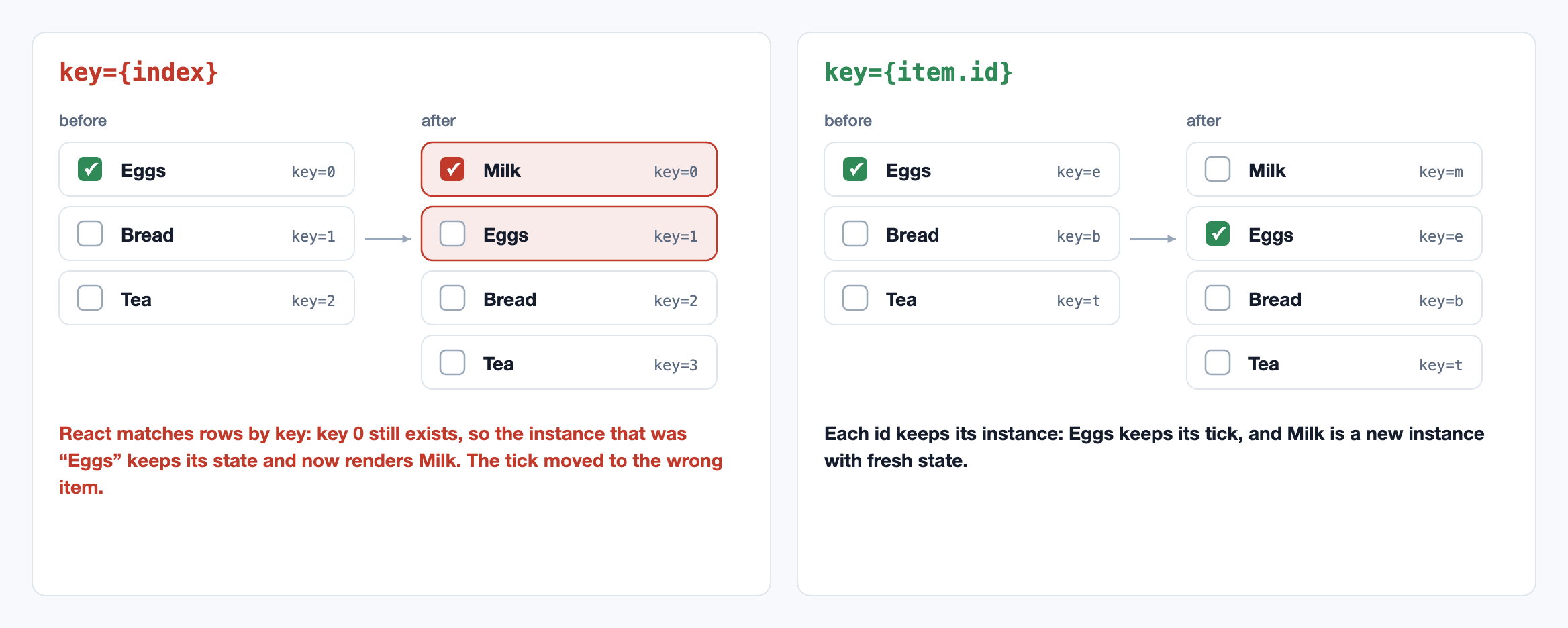
Index keys also cost performance: after an insert at the top, every row’s props change, so every row updates, where stable keys would let React insert one new row and leave the rest alone. Use a stable id from the data. If the data has none, create one when the item is created, not during rendering.
Fixing re-renders with structure
Before reaching for memo, look at where the state lives. Since a state change re-renders the component that owns it and everything inside, the cheapest fix is often to make that “everything” smaller.
- Move state down. If a search query lives at the top of the page but only the search box uses it, every keystroke re-renders the whole page. Move the state into the search box, and typing re-renders only the search box.
- Lift content up. When a wrapper must own fast-changing state, like a scroll position, pass the expensive content in as
children. The children were created by the wrapper’s parent, so when the wrapper re-renders, React sees the very same child elements and skips them. - Split components along what changes. A component that mixes a ticking clock with a large form re-renders the form every second. Two components, each with its own state, don’t.
These changes cost nothing at runtime and make the code easier to follow, because state ends up next to the UI that uses it.
memo, useMemo and useCallback
memo(Component) tells React to skip rendering a component when its props are the same as last time, comparing each prop with Object.is, which for objects and functions means “is this the very same object”, not “does it look the same”. That is the trap: an inline object (style={{…}}), array or arrow function is a brand-new object on every render, so the comparison always fails and memo does nothing except spend time comparing.
useMemo and useCallback exist mainly to fix that: they return the same object or function as last time until their inputs change. Used together, they let a memoised child really be skipped.useMemo also avoids repeating expensive calculations, such as filtering or sorting a large list, on renders where the inputs haven’t changed.
Memoising everything by hand is tedious and easy to break: one new inline prop anywhere in the chain undoes it. The React Compiler, stable since late 2025, does this automatically at build time, analysing each component and caching values and elements that haven’t changed. In a codebase using it, most hand-written useMemo and useCallback become unnecessary, and the structural advice above still applies, because the compiler can’t move your state for you.
Context and external stores
Context passes a value down the tree without threading props through every level. Every component that reads a context re-renders when its value changes, and memo on a parent doesn’t prevent it. Two common mistakes follow:
- A new value object on every render.
<Ctx.Provider value={{ user, setUser }}>creates a new object each time the provider renders, so every consumer re-renders, even ifuserdidn’t change. Memoise the value. - One big context for everything. If the theme, the user and the shopping cart share one context, adding an item to the cart re-renders every component that only wanted the theme. Split contexts by how often they change.
For state that changes often and is read in many places, an external store (Zustand, Redux, Jotai, or your own with useSyncExternalStore) works better. Each component subscribes with a selector, a function that picks the part it needs, such as the number of items in the cart. The store re-renders a component only when its selected value changes, so components that read unrelated parts are left alone.
Signals: a different model
React’s model is “the UI is a function of state”: when state changes, run the functions again and compare the results. Solid, Vue, Svelte 5, Angular and Preact Signals use signals instead. A signal is a value that remembers who read it. When a piece of UI reads query() while being set up, the signal records that dependency. When the value changes, the signal notifies exactly those readers, which update their bit of the DOM directly. There is no re-running of the component and no comparison of trees.
The result is fine-grained updates by default: a keystroke changes one text node, however big the page is. The trade-off is in how you think about the code. In Solid, a component function runs only once, to set things up; code that reads a signal outside a tracked context won’t update, and destructuring a value out of a reactive object can silently cut the connection. React’s approach costs more work at runtime but has fewer such rules: if in doubt, it re-runs everything and the result is still correct.
Both models are converging. React’s compiler removes much of the wasted work automatically, and signal-based frameworks have added conveniences that hide the tracking rules. There is even a TC39 proposal to add signals to JavaScript itself, so that frameworks could share one implementation.
When to care
Most re-renders are harmless, and the time spent removing them is often better spent elsewhere. Look for the cases that matter:
- Frequent updates near the top of a large tree: typing, dragging, scrolling, animation, timers, live data.
- Expensive render functions: large lists, heavy calculations, charts.
- Interactions that feel slow, measured as Interaction to Next Paint on real devices.
For updates that are necessary but heavy, such as filtering a big list as the user types, the fix is not fewer renders but lower priority, with useDeferredValue or startTransition; why that keeps the page responsive is explained in the article on the rendering pipeline.
The patterns in code
Moving state down, lifting content up as children, memoisation that actually holds, stable keys, and subscribing to a slice of a store with useSyncExternalStore.
// 1. Move state down: only the part that uses the state re-renders when it changes.
function Page() {
  return (
    <>
      <SearchBox />        {/* owns its own query state */}
      <ExpensiveReport />  {/* no longer re-renders on every keystroke */}
    </>
  );
}

// 2. Lift content up: pass the expensive part as children. Children are elements
//    created by the parent of ScrollTracker, so they don't change when it re-renders.
function ScrollTracker({ children }: { children: React.ReactNode }) {
  const [y, setY] = useState(0);
  useEffect(() => {
    const onScroll = () => setY(window.scrollY);
    window.addEventListener("scroll", onScroll, { passive: true });
    return () => window.removeEventListener("scroll", onScroll);
  }, []);
  return <div data-scrolled={y > 0}>{children}</div>;
}

// 3. memo only helps if the props really stay the same between renders.
const Results = memo(function Results({ items, onSelect }: ResultsProps) { /* … */ });

function Search({ all }: { all: Item[] }) {
  const [query, setQuery] = useState("");
  const [selected, setSelected] = useState<string | null>(null);
  const items = useMemo(() => all.filter((i) => i.name.includes(query)), [all, query]);
  const onSelect = useCallback((id: string) => setSelected(id), []);
  // Without useMemo and useCallback, items and onSelect would be new objects on every
  // render, memo's comparison would always fail, and Results would re-render anyway.
  return <Results items={items} onSelect={onSelect} />;
}

// 4. Keys: stable ids, never array positions, for lists that can reorder or insert.
{todos.map((t) => <TodoRow key={t.id} todo={t} />)}

// 5. Subscribe to a slice of a store, not the whole thing. The component re-renders
//    only when the value its selector returns changes.
function useCartCount() {
  return useSyncExternalStore(cart.subscribe, () => cart.getState().items.length);
}
References
- React Documentation. Render and Commit, Preserving and Resetting State and You Might Not Need an Effect. react.dev/learn
- React Documentation. memo, useMemo, useSyncExternalStore and React Compiler. react.dev/reference/react
- Abramov, D. (2021). Before You memo(). overreacted.io/before-you-memo
- React Documentation. Rendering Lists: Keeping list items in order with key. react.dev/learn/rendering-lists
- Carniato, R. (2022). A Hands-on Introduction to Fine-Grained Reactivity. dev.to. dev.to/ryansolid
- TC39. Proposal: JavaScript Signals standard. github.com/tc39/proposal-signals
Related reading
Frontend · 10 min read
Rendering on the web: CSR, SSR, streaming and Server Components
When content appears versus when the page responds, client-side and server-side rendering, the hidden cost of hydration, static generation, streaming with Suspense, React Server Components, islands and resumability, and choosing per route.
Frontend · 10 min read
The browser rendering pipeline: layout, paint, compositing and INP
The frame budget and the event loop, style, layout, paint and composite, forced synchronous layout, the compositor thread, long tasks and Interaction to Next Paint, yielding to the browser, and measuring responsiveness in the field.
AI · 10 min read
Speculative decoding: faster generation with an exact proof
Why decoding is bound by memory bandwidth, how a draft model's guesses are verified in one pass, the rejection-sampling proof that the output is exactly the large model's, the expected speedup, and Medusa, EAGLE and tree verification.