· 10 min read
The browser rendering pipeline: layout, paint, compositing and INP
- Frontend
- Web performance
- CSS
- JavaScript
Contents · 10 sections
A page can load fast and still feel slow: a button that takes a quarter of a second to react, a list that stutters as it scrolls, a menu that opens a beat late. Load time is about the network and the server; responsiveness is about what happens on one thread inside the browser, sixty or more times a second. Knowing how the browser turns a DOM change into pixels makes most of these problems easy to find and fix.
This article covers the frame budget and the event loop, the stages of the rendering pipeline and which CSS changes trigger which stages, forced synchronous layout, the compositor thread, long tasks and Interaction to Next Paint, how to yield to the browser, and how to measure all of it on real users’ devices. How and where the HTML is produced in the first place is covered in the article on rendering strategies.
A frame and its budget
A 60 Hz display shows a new frame every 16.7 ms; at 120 Hz, every 8.3 ms. The browser tries to produce a frame in time for each one, but it can only do so when the main thread is free. The main thread runs an event loop: take one task from a queue (a script, an event handler, a timer callback, a network response), run it to completion, run any microtasks it queued, such as promise callbacks, and then, if it is time for a new frame, render.
Rendering only happens between tasks. A task that runs for 200 ms means no frames for 200 ms, and no response to input either, because input events are tasks too. JavaScript, style calculation and layout all share this one thread. The budget is less than the frame interval, since the browser needs part of each frame for its own work; a few milliseconds of script per frame is the safe amount during an animation or scroll.
Style, layout, paint, composite
Producing a frame after something changes is a pipeline:
- Style. Work out which CSS rules apply to which elements and compute each element’s final styles.
- Layout. Compute the size and position of every box. Layout is often global: making one element taller moves everything after it.
- Paint. Record the drawing commands for each layer: backgrounds, text, borders, shadows. This produces display lists, not pixels.
- Composite. On a separate compositor thread, rasterise layers into tiles, mostly on the GPU, and combine them, with their transforms and opacity, into the final frame.
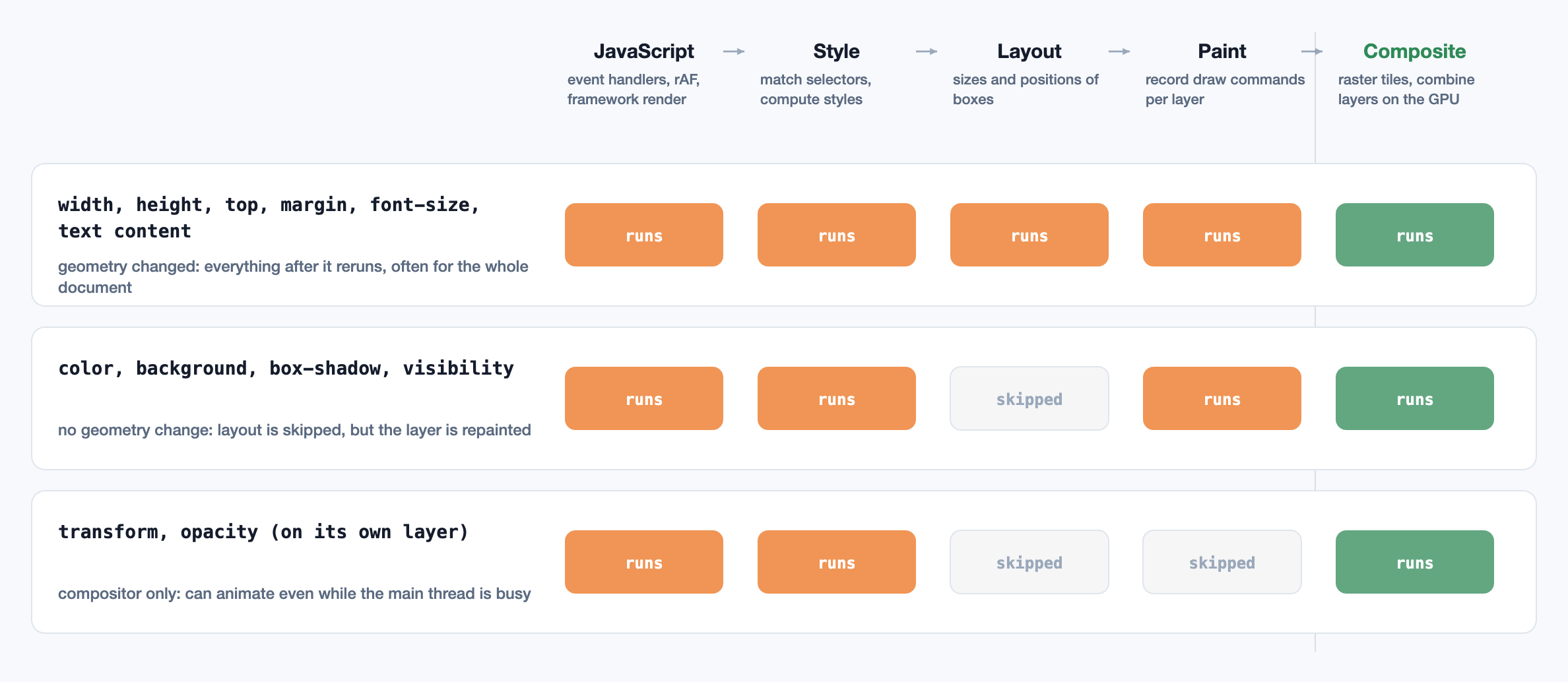
The stage a change starts at sets its cost. A change to geometry starts at layout and runs everything after it. A change to colour skips layout but repaints. A change to transform or opacity on an element that has its own compositor layer skips both, and the compositor can apply it by itself. That is why animations should move things with transform rather than top or left, and fade them with opacity rather than visibility or colour.
Forced layout and layout thrashing
The browser defers style and layout until it needs them, normally at the next frame, so that many DOM changes cost one layout. Reading a geometric property breaks that: offsetHeight, getBoundingClientRect(), scrollTop and getComputedStyle() must return current values, so if anything has changed since the last layout, the browser runs style and layout immediately, inside your script. This is a forced synchronous layout.
One is usually fine. A loop that alternates writes and reads, setting one element’s height and then reading the next element’s, forces a full layout on every iteration. With a few hundred elements, that loop can take hundreds of milliseconds where batching would take a few. This pattern is layout thrashing, and the Performance panel in Chrome DevTools flags it with a warning on each forced layout.
The fix is to read everything first and then write everything. Where reads are needed after writes, defer them to the next frame with requestAnimationFrame, or let ResizeObserver and IntersectionObserver deliver geometry after layout instead of asking for it.
The compositor thread
The compositor runs on its own thread, so it can keep producing frames while the main thread is blocked, as long as nothing in the frame needs the main thread. Scrolling, and transform and opacity animations on composited layers, run there: a page whose JavaScript is stuck can often still scroll smoothly.
Two things pull work back onto the main thread:
- Non-passive event listeners for
touchstart,touchmoveandwheel. The compositor can’t scroll until the listener has run, in case it callspreventDefault(). Mark listeners{ passive: true }unless they really need to cancel the scroll; browsers now default document-level touch and wheel listeners to passive. - Animating properties the compositor can’t, such as
width,heightorbox-shadow, which need layout or paint every frame.
Layers aren’t free. Each one costs GPU memory for its tiles, and promoting hundreds of elements with will-change: transform can exhaust memory on a phone and slow compositing down. Promote what is about to animate, and remove the hint afterwards.
Long tasks and Interaction to Next Paint
A long task is any main-thread task over 50 ms. During one, the page can’t respond. Google’s Core Web Vitals measure this with Interaction to Next Paint (INP), which replaced First Input Delay in March 2024. INP observes every click, tap and key press during a visit and reports roughly the worst, ignoring one outlier for every 50 interactions. For each interaction it measures the time from the input to the next frame presented on screen, in three parts:
- Input delay: waiting for whatever task was already running when the user acted.
- Processing: running the event handlers.
- Presentation delay: style, layout, paint and compositing for the resulting frame.
At the 75th percentile of page visits, 200 ms or less is good and over 500 ms is poor. Note what INP measures: not when the work finishes, but when the user first sees something change. That gives a direct strategy for improving it.
Yielding to the browser
The browser can only render or handle input between tasks, so the fix for long tasks is to split them, and to do the work the user sees first:
- Update the UI, then yield. In an event handler, make the cheap visible change (pressed state, spinner, optimistic result), then yield so a frame can be painted, then continue.
- Break up loops. Process in slices of a few milliseconds and yield between them.
scheduler.yield()resumes your work ahead of other queued tasks where it is supported;setTimeout(…, 0)works everywhere but sends the continuation to the back of the queue. - Let the framework yield. In React, state updates wrapped in
startTransition, or values read throughuseDeferredValue, render in interruptible chunks, so urgent updates such as typing are handled first. - Move work off the main thread. Parsing, sorting, diffing and anything else that doesn’t touch the DOM can run in a Web Worker.
- Do less. The most common source of long tasks is third-party script and oversized JavaScript bundles evaluated at load time. Hydration of a large server-rendered page is another; see rendering strategies.
Doing less layout and paint
When layout or paint itself is the cost, the goal is to make it touch fewer elements:
content-visibility: autoskips style, layout and paint for off-screen sections until they approach the viewport. Pair it withcontain-intrinsic-sizeso the scrollbar doesn’t jump. On long pages the saving is large.- CSS containment (
contain: layout paint) promises the browser that an element’s insides don’t affect anything outside it, so a change inside it doesn’t trigger layout of the whole document. - Smaller DOMs. Style and layout cost grows with the number of elements. Virtualise long lists so only the visible rows exist.
- Simpler selectors and fewer style changes matter less than they used to, but changing a class on
<body>still forces style recalculation for the entire page.
Measuring it in the field
A fast laptop in the lab hides most of these problems. A mid-range Android phone runs JavaScript several times slower, and that is where real INP is set. Two kinds of data are needed:
- Lab: the Performance panel shows each task, forced layouts and which frames were dropped. Turn on CPU throttling to approximate a phone.
- Field: real user monitoring of INP, LCP and CLS, with attribution. The
web-vitalslibrary reports which element was interacted with and how the time split across input delay, processing and presentation. The Long Animation Frames API (in Chromium since version 123) goes further, listing the scripts that ran during each slow frame, including third-party ones.
Field data says where the problem is; lab profiles say why. A large input delay points at some other task running when the user clicked, often a third-party script or a timer. Large processing points at your own handlers. Large presentation delay points at expensive style, layout or paint after the change.
Yielding and attribution in code
A handler that shows feedback, yields, and processes the rest in time slices; batching layout reads before writes; and reporting INP from real users, with the phase breakdown that says where to look.
// Give the browser a chance to render and handle input, then carry on.
// scheduler.yield() resumes ahead of other queued tasks; setTimeout is the fallback.
function yieldToMain(): Promise<void> {
  if ("scheduler" in globalThis && "yield" in scheduler) return scheduler.yield();
  return new Promise((resolve) => setTimeout(resolve, 0));
}

// A click handler that shows feedback first and does the heavy work afterwards.
button.addEventListener("click", async () => {
  button.setAttribute("aria-busy", "true");       // cheap visual update for this frame
  await yieldToMain();                            // let it paint: this is what INP measures

  const rows = await loadRows();
  let deadline = performance.now() + 8;           // work in slices of about half a frame
  for (const row of rows) {
    applyFilter(row);
    if (performance.now() > deadline) {
      await yieldToMain();
      deadline = performance.now() + 8;
    }
  }
  renderTable(rows);
  button.removeAttribute("aria-busy");
});

// Batch layout reads before writes, so the browser lays out once, not once per item.
const heights = items.map((el) => el.getBoundingClientRect().height);   // all reads
items.forEach((el, i) => { el.style.minHeight = `${heights[i]}px`; });   // then all writes

// Field measurement: which interaction was slow, and which phase of it.
import { onINP } from "web-vitals/attribution";

onINP(({ value, rating, attribution }) => {
  navigator.sendBeacon("/vitals", JSON.stringify({
    name: "INP",
    value,                                   // ms from input to the next frame presented
    rating,                                  // "good" ≤ 200, "poor" > 500
    target: attribution.interactionTarget,   // a CSS selector for the element
    inputDelay: attribution.inputDelay,      // waiting for other tasks to finish
    processing: attribution.processingDuration,
    presentation: attribution.presentationDelay,
  }));
});
References
- WHATWG. HTML Living Standard: Event loops. html.spec.whatwg.org
- Wagner, J. Interaction to Next Paint (INP) and Optimize long tasks. web.dev. web.dev/articles/inp
- Lewis, P. Rendering Performance and Avoid large, complex layouts and layout thrashing. web.dev. web.dev
- Chromium Project. Life of a Pixel and RenderingNG architecture. developer.chrome.com
- W3C. CSS Containment Module Level 2 (
content-visibility). w3.org/TR/css-contain-2 - Google Chrome. web-vitals library. github.com/GoogleChrome/web-vitals
- W3C Web Performance Working Group. Long Animation Frames API. w3c.github.io/long-animation-frames
Related reading
Frontend · 10 min read
Rendering on the web: CSR, SSR, streaming and Server Components
When content appears versus when the page responds, client-side and server-side rendering, the hidden cost of hydration, static generation, streaming with Suspense, React Server Components, islands and resumability, and choosing per route.
Frontend · 11 min read
Why React re-renders: reconciliation, keys, memo and signals
What a render is and why most are cheap, the three reasons a component renders, how React decides what to keep, why keys are identity, structural fixes before memo, context and stores, and how signals take a different path.