· 10 min read
Rendering on the web: CSR, SSR, streaming and Server Components
- Frontend
- React
- Next.js
- Web performance
Contents · 11 sections
Every web framework now offers a menu of rendering modes: client-side, server-side, static, incremental, streaming, server components. The names describe where HTML gets made. What users feel is when the page appears and when it responds, and those two moments are controlled by different things. Most rendering decisions that go wrong confuse them.
This article walks through the main strategies by what each one does to those two moments, explains hydration and why it is the cost that server rendering hides, and shows how streaming and React Server Components change the trade-off.
Two questions, not one
For any page, ask two separate questions:
- When does content appear? Measured by First Contentful Paint and Largest Contentful Paint (LCP). It is driven by how soon the browser receives HTML it can draw, which depends on server time, network round trips, and whether the content is in the HTML or has to be built by JavaScript first.
- When does the page respond? Measured by Interaction to Next Paint (INP) and, more crudely, by when the main thread is free. It is driven by how much JavaScript must be downloaded, parsed and run before event handlers are attached.
Server rendering mainly improves the first. Only shipping and running less JavaScript improves the second. Keep that distinction in mind and most of the rest follows.
Client-side rendering
In a classic single-page application, the server returns an almost empty HTML document and a JavaScript bundle. The bundle runs, fetches data from an API, and builds the DOM. Nothing useful is on screen until all of that has happened, in sequence: download the HTML, download the JavaScript, run it, fetch the data, render.
CSR is simple to deploy, since the frontend is a static bundle on a CDN and the backend is an API, and once loaded, navigation between views can be very fast. Its costs are the first load on slow devices and networks, where the request waterfall and the size of the JavaScript dominate, and content that crawlers and link previews may not see. For a logged-in dashboard used all day on desktop machines, those costs can be acceptable. For a public page whose first impression matters, they usually aren’t.
Server-side rendering
With SSR, the server runs the same components, fetches the data, and sends finished HTML. The browser can paint content as soon as the HTML arrives, without waiting for any JavaScript, and crawlers see the full page.
Two things are easy to miss. First, the server now does the data fetching before it can send anything, so a slow query delays the whole response: time to first byte grows by the time of the slowest fetch. Second, the HTML is only a picture of the page. The buttons don’t work until the JavaScript for the same components has downloaded and run, which is the next section’s subject.
The cost of hydration
Hydration is the step where the framework, in the browser, runs the component tree again, matches the result against the server’s HTML, and attaches event handlers. It makes a server-rendered page interactive, and it is expensive in three ways:
- All the code ships. To re-run the components, the browser needs every component on the page, including ones that only display text and will never respond to anything, plus whatever libraries they import: a Markdown parser, a date-formatting library, a syntax highlighter.
- The data ships twice. Once as HTML, and again as serialised props so the components can re-render to the same result.
- The work runs on the main thread. While hydration runs, taps and keystrokes queue up. On a mid-range phone, hydrating a large page can block the main thread for hundreds of milliseconds.
The result is an awkward middle state: a page that looks finished and doesn’t respond. Users tap, nothing happens, they tap again. That is worse than a loading indicator, because it looks like a broken page.
Static generation and caching
If the HTML for a URL is the same for every visitor, render it once and serve it from a CDN. Static site generation does that at build time. Incremental regeneration, or a cached server render with a revalidation time, does it on demand: the first request renders, later requests get the cached copy, and it is refreshed in the background after it goes stale.
Static and cached pages have the best possible time to first byte, since a CDN edge is close to the user and does no work. They still have to hydrate, so static generation fixes the first question but not the second. The hard part is invalidation, exactly as with any other cache: deciding when a product page must be regenerated because the price changed.
Many pages are mostly static with a few personalised parts, such as a cart count or a user’s name. Rendering those per request makes the whole page dynamic. Next.js’s Partial Prerendering serves the static shell from the cache and streams the dynamic holes into it, which is the streaming idea applied to caching.
Streaming
Classic SSR waits for every data fetch before sending a byte. Streaming SSR sends HTML as it becomes ready. In React 18 and later, parts of the tree wrapped in Suspense can wait on slow data while the rest of the page is sent immediately with a fallback in their place. When the slow part resolves, the server streams its HTML down the same response, with a small inline script that slots it into position.
Streaming fixes the slowest-query problem: the shell and fast content paint immediately, and slow sections arrive on their own schedule. It also enables selective hydration. Each Suspense boundary hydrates independently, sooner for sections that arrived first, and React hydrates the section the user is interacting with first. The page becomes interactive piece by piece instead of all at once.
One caveat: once the first byte is sent, the HTTP status and headers are committed. A page that only discovers a 404 or a redirect inside a streamed section has to handle it differently, so do the checks that decide the status code before the first flush.
React Server Components
Streaming reduces waiting; it doesn’t reduce the JavaScript. React Server Components do. A Server Component runs only on the server. Its output is sent to the browser as a serialised tree, not as code, so its code and its imports never ship and it never hydrates. Only components marked "use client" ship JavaScript, and they hydrate as islands inside a server-rendered page.
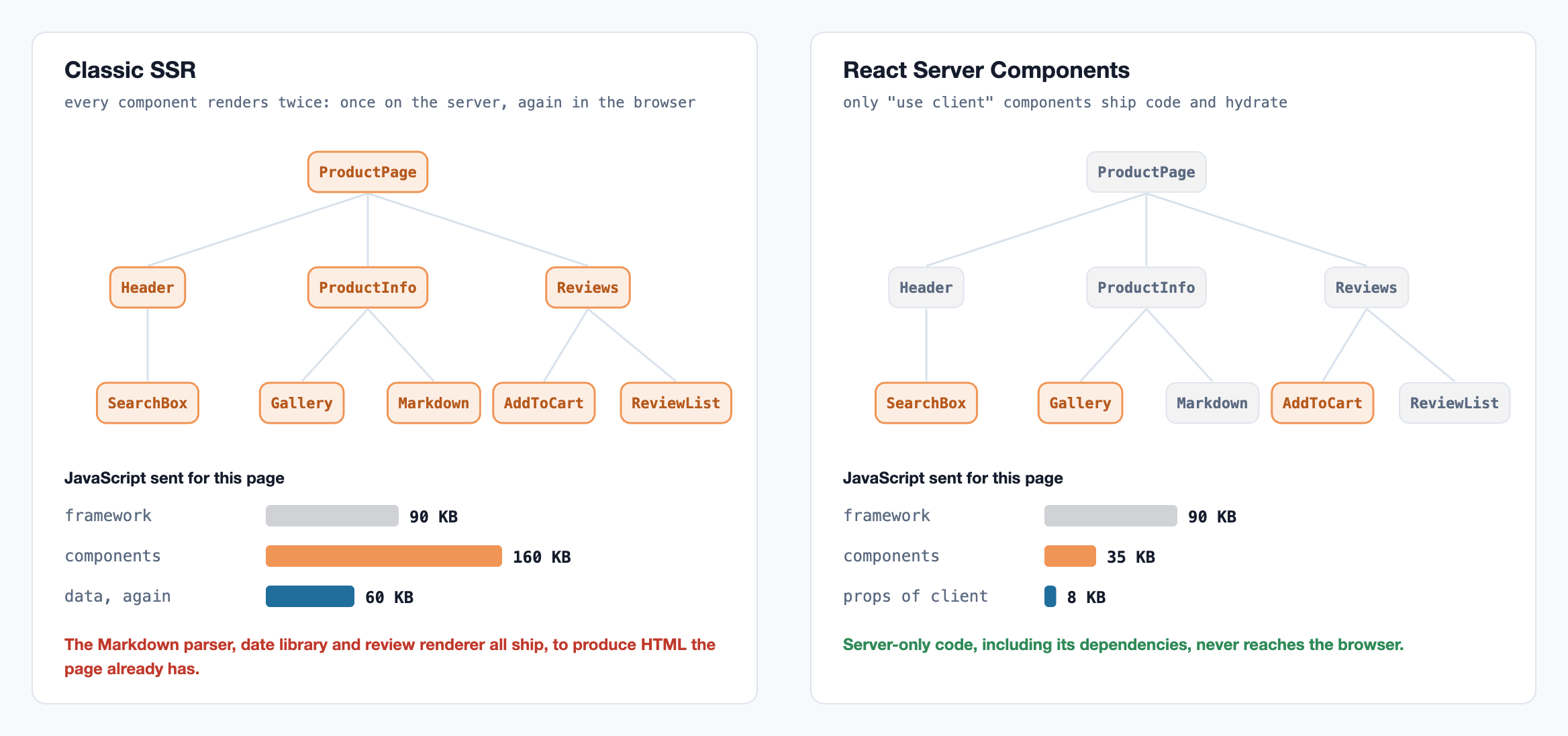
This changes how a page is designed:
- Data fetching moves into components. A Server Component can
awaita database query directly, close to where the data is used, without building an API endpoint for it. - Heavy dependencies become free, as long as they’re used only on the server. Rendering Markdown or highlighting code on the server costs the browser nothing.
- The client boundary needs care. Everything a client component imports becomes client code, and its props must be serialisable. Push
"use client"down to the leaves that really need state or event handlers, and pass server-rendered content into them aschildren. - Secrets need care too. A Server Component can read secrets and query the database, so be deliberate about what crosses into client props. Mark server-only modules with the
server-onlypackage so an accidental client import fails the build.
Islands and resumability
Server Components are one answer to hydration cost. Two others are worth knowing:
- Islands architecture (Jason Miller, 2020; Astro is the best-known implementation). The page is static HTML by default, and only marked components hydrate, each independently, and optionally only when visible or idle. It is ideal for content sites with a little interactivity.
- Resumability (Qwik). The server serialises enough state and handler references into the HTML that the browser never re-runs components at all. Code for a handler is fetched when it is first needed. It removes hydration entirely, at the cost of a very different programming model.
Choosing per route
Modern frameworks let you choose per route, and most real applications should mix strategies. A reasonable default:
- Marketing, docs, blog posts: static or cached, mostly Server Components, a few client islands.
- Product and listing pages: cached shell with streamed personalised parts; slow sections behind Suspense.
- Logged-in dashboards and editors: server-render the frame and first data, then let a client-heavy core take over. Here client-side interactivity is the product, and it is fine to ship the JavaScript it needs.
Measure with field data, not a fast laptop. Real-user LCP and INP at the 75th percentile, split by device class, show where users actually wait. A lab trace on a throttled mid-range phone shows why.
A streamed page with one client island
A Next.js App Router product page. The page and the reviews are Server Components; the reviews stream in behind Suspense so a slow query doesn’t hold back the paint. The only JavaScript that ships for the page’s own content is the add-to-cart button.
// app/products/[id]/page.tsx: a Server Component. It runs only on the server,
// so neither its code nor its database client is ever sent to the browser.
import { Suspense } from "react";
import { db } from "@/lib/db";
import { AddToCart } from "./add-to-cart";

export default async function ProductPage({ params }: { params: Promise<{ id: string }> }) {
  const { id } = await params;
  const product = await db.product.find(id); // fast, and needed for the first paint
  return (
    <main>
      <h1>{product.name}</h1>
      <p>{product.description}</p>
      <AddToCart productId={id} price={product.price} />
      {/* Reviews are slow. The page above streams now; this streams in when ready. */}
      <Suspense fallback={<p>Loading reviews…</p>}>
        <Reviews productId={id} />
      </Suspense>
    </main>
  );
}

async function Reviews({ productId }: { productId: string }) {
  const reviews = await db.review.forProduct(productId); // slow query, off the critical path
  return <ul>{reviews.map((r) => <li key={r.id}>{r.text}</li>)}</ul>;
}
// app/products/[id]/add-to-cart.tsx: the only code on this page that ships to the
// browser and hydrates. Its props cross the network, so they must be serialisable.
"use client";
import { useState, useTransition } from "react";
import { addToCart } from "./actions"; // a Server Action: called like a function, runs on the server

export function AddToCart({ productId, price }: { productId: string; price: number }) {
  const [added, setAdded] = useState(false);
  const [pending, start] = useTransition();
  return (
    <button disabled={pending} onClick={() => start(async () => { await addToCart(productId); setAdded(true); })}>
      {added ? "Added" : "Add to cart · $" + price.toFixed(2)}
    </button>
  );
}
References
- Miller, J. & Osmani, A. (2019). Rendering on the Web. web.dev. web.dev/articles/rendering-on-the-web
- Abramov, D. et al. (2021). New Suspense SSR Architecture in React 18. React 18 Working Group. github.com/reactwg/react-18
- React. Server Components and hydrateRoot reference. react.dev
- Next.js. Server and Client Components, Loading UI and Streaming. nextjs.org/docs
- Miller, J. (2020). Islands Architecture. jasonformat.com
- Qwik. Resumable vs. Hydration. qwik.dev
- web.dev. Largest Contentful Paint and Interaction to Next Paint. web.dev/articles/inp
Related reading
Frontend · 11 min read
Why React re-renders: reconciliation, keys, memo and signals
What a render is and why most are cheap, the three reasons a component renders, how React decides what to keep, why keys are identity, structural fixes before memo, context and stores, and how signals take a different path.
Frontend · 10 min read
The browser rendering pipeline: layout, paint, compositing and INP
The frame budget and the event loop, style, layout, paint and composite, forced synchronous layout, the compositor thread, long tasks and Interaction to Next Paint, yielding to the browser, and measuring responsiveness in the field.