· 11 min read
HTTP/1.1, HTTP/2 and HTTP/3: connections, multiplexing and head-of-line blocking
- HTTP
- Networking
- Performance
- Load balancing
Contents · 10 sections
- 01What a connection costs
- 02HTTP/1.1: one request at a time
- 03HTTP/2: many requests, one connection
- 04Head-of-line blocking moves down a layer
- 05HTTP/3: streams in the transport
- 06What changes behind the load balancer
- 07Keep-alive timeouts and mystery 502s
- 08Choosing, and checking what you got
- 09A server that plays well with its load balancer
- 10References
Each version of HTTP was built to fix one main problem in the version before it. HTTP/2 fixed the browser having to wait for one response before asking for the next. HTTP/3 fixed a problem HTTP/2 made worse: one lost packet holding up everything else. Once you see what each version actually changed, a lot of practical advice makes sense, from “don’t bundle everything into one file” to “why does my load balancer return 502s during deploys”.
This article walks through what it costs to open a connection, how each version uses connections, where head-of-line blocking comes from and why it moved rather than disappeared, and what all of this means for services behind a load balancer, which is where most backend engineers meet these protocols day to day.
What a connection costs
Before a browser can send a single HTTPS request to a new server, it has to set up a connection, and every step of that setup is a round trip: a message to the server and a reply. A round trip is limited by distance. From London to a server in Virginia it is roughly 80 ms, and no amount of server speed changes that.
Over TCP, the browser first does the TCP handshake (one round trip), then the TLS handshake that sets up encryption (one round trip with TLS 1.3, two with the older TLS 1.2), and only then sends the request (one more). HTTP/3 runs on QUIC, which combines the transport and encryption handshakes into one. And when a browser has talked to the server recently, it can send its request inside the very first packet.
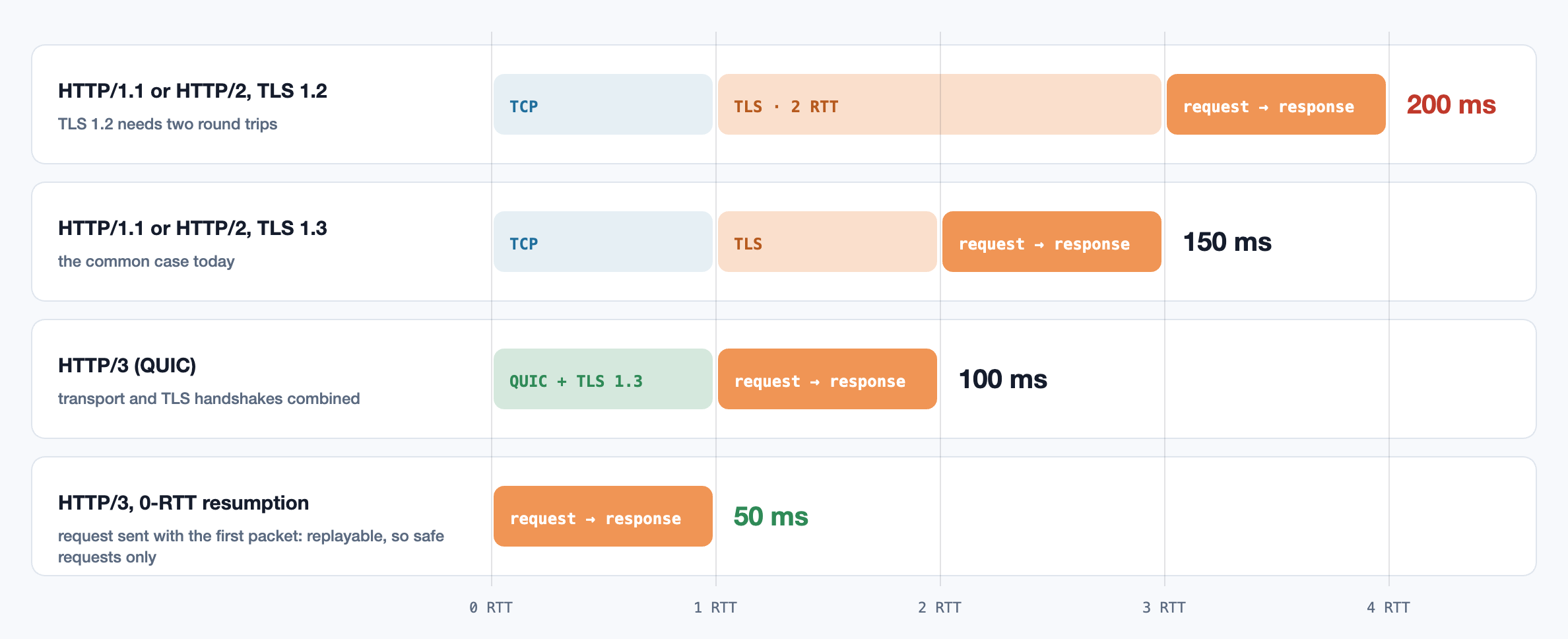
That first-packet request, called 0-RTT, has a catch. An attacker who records the packet can send it again, and the server can’t tell the copy from the original. So it is only used for requests that are safe to repeat, like loading a page, never for “pay this invoice”.
The bigger lesson is that connections are expensive and worth keeping. Every version of HTTP since 1.1 keeps connections open between requests, and much of the design of HTTP/2 and HTTP/3 is about getting more out of each connection once you have paid for it.
HTTP/1.1: one request at a time
HTTP/1.1 is a text protocol, and on each connection the client sends one request, then waits for the whole response before sending the next. (A feature called pipelining was meant to fix this, but it was so unreliable that browsers never turned it on.) If one response is slow, everything queued behind it on that connection waits. That is head-of-line blocking: the item at the front of the line holds up everyone behind it, like a single checkout where one customer is paying in coins.
Browsers worked around it by opening up to six connections per server, so six requests could be in flight at once. Web developers worked around the limit of six: they spread files across extra domains, glued small images into one big “sprite”, and bundled all their JavaScript into one large file. These hacks were all about reducing the number of requests, because requests were what was expensive.
HTTP/2: many requests, one connection
HTTP/2 keeps HTTP’s meaning (methods, headers, status codes) but changes how it travels. Each request and its response become a stream, and every stream is cut into small frames tagged with its stream number. Frames from many streams are interleaved on a single connection, and the receiver uses the tags to put each stream back together. A slow response no longer blocks a fast one: their frames simply share the line.
Three more changes came with it:
- Header compression (HPACK). Requests to the same server repeat almost the same headers: cookies, user agent, accept types. HTTP/2 remembers headers it has already sent and refers to them by number, which saves a lot on pages that make hundreds of requests.
- Binary framing. Frames are easy for machines to parse exactly, which removes a whole class of bugs where a proxy and a server disagreed about where one text request ended.
- Server push, letting a server send files before they were requested. It was hard to use well, often sent things the browser already had cached, and Chrome removed it in 2022. Preload hints and the
103 Early Hintsresponse do the job more simply.
Since requests became cheap, the old hacks became harmful. Spreading files over several domains means several connections, each with its own handshake and its own slow start. Giant bundles mean that changing one line of code invalidates the whole cached file. With HTTP/2, many moderately sized files are fine.
Head-of-line blocking moves down a layer
HTTP/2 removed head-of-line blocking from HTTP, but it still runs on TCP, and TCP has its own version of the problem. TCP promises to deliver bytes in exactly the order they were sent. If one packet is lost, every packet after it waits in the receiver’s buffer until the missing one is resent, even though they have already arrived. TCP has no idea that those later bytes belong to different, unrelated responses.
On a good wired network, losses are rare and this hardly matters. On a phone moving between cell towers, or on busy Wi-Fi, losses are routine. HTTP/2 puts all of a page’s requests on one connection, so one loss stalls all of them, while HTTP/1.1’s six separate connections would only have stalled one. Measurements on lossy mobile networks have found HTTP/2 doing no better, and sometimes worse, than HTTP/1.1 for exactly this reason.
HTTP/3: streams in the transport
The real fix had to be in the transport layer, and changing TCP is nearly impossible: it lives inside every operating system, and routers and firewalls along the way inspect and sometimes rewrite it. So QUIC is built on top of UDP, which networks pass through without interference, and implements reliable delivery itself, usually inside the application or browser rather than the operating system.
What QUIC changes:
- Streams are part of the transport. QUIC knows which bytes belong to which stream, so a lost packet only delays its own stream. This is the change in Figure 2.
- Faster setup. Transport and encryption are negotiated together, and encryption is not optional: almost everything, including much of the packet header, is encrypted, which also stops middleboxes from depending on details that would make the protocol hard to change later.
- Connections survive a network change. A TCP connection is identified by the two IP addresses and ports, so walking out of Wi-Fi range onto mobile data breaks it. A QUIC connection is identified by a connection ID, so it can carry on from the new address.
The costs are real too. Some corporate networks block UDP, so browsers always keep a TCP fallback and learn that a server supports HTTP/3 from an Alt-Svc header or a DNS record before trying it. QUIC also uses more CPU than TCP, partly because years of hardware and kernel optimisation for TCP don’t apply to it yet. For most sites, the CDN handles HTTP/3 at the edge and talks to the origin over HTTP/1.1 or HTTP/2.
What changes behind the load balancer
Between services, the trade-offs are different: networks inside a data centre rarely lose packets, round trips are under a millisecond, and the clients are your own code. Here HTTP/2’s main value is many concurrent requests over few connections, which is why gRPC is built on it. But long-lived, multiplexed connections have side effects.
- Load balancing by connection stops working. A simple (layer 4) load balancer spreads connections, not requests. With HTTP/1.1 that was close enough, because clients opened many connections. A gRPC client opens one connection and sends every request down it, so every request goes to the same backend, and adding servers doesn’t spread the load. You need a balancer that understands HTTP/2 and spreads individual requests, or client-side balancing across several connections.
- Stream limits. A server allows a limited number of concurrent streams per connection, often 100. A client that needs more must open extra connections or queue, and that queueing shows up as latency that no server-side metric explains. (Why queues make latency jump is covered in the article on queueing.)
- Draining connections during deploys. HTTP/2 has a
GOAWAYmessage that tells the client “finish what you have, then reconnect elsewhere”. Servers should send it when shutting down; otherwise long-lived connections keep pointing at instances that are about to disappear. - Cheap requests can be abused. Because opening and cancelling a stream costs a client almost nothing, the 2023 “Rapid Reset” attack opened and cancelled streams in a tight loop to overwhelm servers. Keep HTTP/2 libraries and proxies up to date; this is a protocol where the defaults matter.
Keep-alive timeouts and mystery 502s
One of the most common production puzzles: a small, steady trickle of 502 Bad Gateway errors from a load balancer, with nothing in the application logs. The cause is usually two idle timers disagreeing.
Both the load balancer and the application server keep idle connections open so they can reuse them. Each side has a timer for how long an idle connection may stay open. Suppose the balancer’s timer is 60 seconds and the server’s is 5 seconds, which is Node.js’s default. After 5 idle seconds the server closes the connection. If, in the same few milliseconds, the balancer decides to reuse that connection for a new request, the request arrives on a connection that is already closing. The server never sees it, so there is nothing in its logs, and the balancer reports a 502.
Choosing, and checking what you got
- For browsers, enable HTTP/2 and HTTP/3 at the edge, usually in your CDN. It is mostly a setting, it helps most on mobile, and browsers fall back safely.
- For service-to-service calls, HTTP/2 (gRPC, or plain HTTP/2) is a good default; make sure the load balancer spreads requests rather than connections. HTTP/1.1 with connection reuse is perfectly adequate for modest traffic.
- Reuse connections everywhere. A client that opens a fresh connection per request pays the handshakes every time and can exhaust ports on a busy host. Most HTTP libraries pool connections only if you reuse the same client object.
- Verify, don’t assume. The browser’s network panel has a Protocol column, and curl can report the version it negotiated. Proxies often quietly downgrade connections to HTTP/1.1 on the hop to your application.
A server that plays well with its load balancer
A Node.js server with idle timeouts set longer than the balancer’s, a graceful shutdown that finishes in-flight requests and closes idle connections, connection reuse for outgoing calls, and two commands that show which protocol a server actually speaks.
import http from "node:http";

const server = http.createServer(app);

// The load balancer keeps an idle connection open for 60 s and may reuse it at any
// moment. Node's default is to close idle connections after 5 s. If Node closes one just
// as the balancer sends a request down it, the request fails and the user sees a 502.
// The rule: the server must wait longer than the balancer before closing.
server.keepAliveTimeout = 65_000;
server.headersTimeout = 66_000;   // must be longer than keepAliveTimeout
server.requestTimeout = 30_000;   // a slow client can't hold a request open forever

server.listen(8080);

// Graceful shutdown on deploy: stop taking new connections, let in-flight requests
// finish, and close idle keep-alive connections so the balancer opens new ones elsewhere.
process.on("SIGTERM", () => {
  server.close(() => process.exit(0));
  server.closeIdleConnections();
  setTimeout(() => process.exit(1), 25_000).unref();   // don't wait forever
});

// Outgoing calls: reuse connections instead of paying a new handshake every time.
// fetch in Node pools connections per origin; an http.Agent does the same for http.request.
const agent = new http.Agent({ keepAlive: true, maxSockets: 50 });

// Which protocol did a server actually speak?
//   curl -so /dev/null -w '%{http_version}\n' https://example.com
//   curl -sI --http3 https://example.com     (needs a curl built with HTTP/3)
References
- Fielding, R., Nottingham, M. & Reschke, J. (2022). RFC 9110: HTTP Semantics and RFC 9112: HTTP/1.1. IETF. rfc-editor.org/rfc/rfc9110
- Thomson, M. & Benfield, C. (2022). RFC 9113: HTTP/2. IETF. rfc-editor.org/rfc/rfc9113
- Iyengar, J. & Thomson, M. (2021). RFC 9000: QUIC: A UDP-Based Multiplexed and Secure Transport. IETF. rfc-editor.org/rfc/rfc9000
- Bishop, M. (2022). RFC 9114: HTTP/3. IETF. rfc-editor.org/rfc/rfc9114
- Langley, A. et al. (2017). The QUIC Transport Protocol: Design and Internet-Scale Deployment. SIGCOMM. doi:10.1145/3098822.3098842
- Grigorik, I. (2013). High Performance Browser Networking. O’Reilly. hpbn.co
- Pollard, B. (2022). HTTP/2 in Action. Manning. manning.com
Related reading
Backend · 11 min read
Caching without lying: invalidation, stampedes and cold starts
Cache-aside, read-through and write-through, the invalidation race delete-on-write leaves open, leases and change-data-capture invalidation, cache stampedes and XFetch, and what happens when the cache becomes load-bearing.
Backend · 12 min read
Queueing for engineers: Little’s law, utilisation and tail latency
Little’s law, why latency explodes as utilisation nears 100%, Kingman’s formula and the cost of variability, shared queues and the power of two choices, sizing connection pools, overload, and planning headroom.
Backend · 11 min read
Microservices vs the modular monolith: what you actually buy
What a service boundary costs and buys: partial failure and ambiguous timeouts, how availability and tail latency compound across hops, data ownership, bounded contexts and Conway’s law, and when a modular monolith is the better trade.