· 24 min read
Inside an AI coding agent: loops, attention, context and orchestration
- AI agents
- Context engineering
- LLMs
- Orchestration
Contents · 12 sections
Give an AI coding agent “fix the login redirect” and it will search the repository, read three files, run the tests, edit a function, run the tests again and stop. It will do that without being told the steps. Under the hood there is no plan-following engine: a language model is called in a loop, and everything that looks like memory, focus or persistence is built from what the loop puts into the model’s context.
This article is about that construction. It starts with the loop, then goes down to attention, the mechanism that decides what the model actually uses from its context, and why that mechanism gets worse as the context grows. Most of the rest follows from that: how agents decide what goes into the window, why they keep it append-only, how they stay on task across hundreds of steps, and when it is worth splitting work across several agents with different roles, coordinated as a graph.
An agent is a loop
Strip away the product and a coding agent is three parts. The model reads the context and produces either text or a structured tool call (“run grep -rn redirect src/auth”). The harness executes the call, enforces permissions and limits, and appends the result to the context. The loop repeats until the model replies without a tool call, which is how it says “I’m done”. This is the ReAct pattern (Yao et al., 2022) of reasoning interleaved with acting, and nearly every agent today is a variation on it.
Three things in Fig. 1 matter for everything that follows:
- The model is stateless. Between calls it remembers nothing. Each step, the harness sends the whole context again: system prompt, tool definitions, project memory, every message and every tool result so far. The context is the agent’s state.
- Tool results dominate. The model writes a few hundred tokens per step. A single file read or test run can add thousands. Context grows fast, and mostly with things the model only needed to glance at once.
- Stopping is a decision, not an event. Nothing outside the loop knows the task is finished. The model decides, and a good harness checks that decision against something objective, such as tests, a type check or the todo list, before accepting it.
The interface between model and tools matters more than it looks. The SWE-agent paper (Yang et al., 2024) called it the agent–computer interface and showed that the same model solves far more real GitHub issues when the tools are designed for it: a file viewer that shows a bounded window of lines, search that summarises matches instead of dumping them, and an editor that runs a linter and rejects syntax errors on the spot. Tool design is context design, because every tool decides how many tokens its answer costs.
Attention: what the model actually sees
“The model has a 200k-token context window” suggests that it reads all 200k tokens equally. It doesn’t. Inside a transformer, each new token is computed by attention: it builds a query, compares it with a key for every earlier token, and takes a weighted mix of their values (Vaswani et al., 2017):
The softmax is the important part. It turns raw similarity scores into weights that are positive and sum to exactly 1. Attention is a fixed budget per head, per layer, per token. Each token added to the context competes for that budget. A well-placed instruction that got most of the weight in a 2k-token context has to share it with everything else in a 150k-token one.
Real models are not that simple, since there are many heads and layers and models are trained on long contexts. But the measured behaviour matches the picture. Liu et al. (2023) found that models use information at the start and end of a long context much better than information in the middle. Chroma’s “context rot” study (2025) found that performance on simple retrieval and reasoning tasks degrades as input length grows, well before the advertised limit, and degrades faster when the context contains distractors: text that looks relevant but isn’t. In a coding session that means the error message from twenty steps ago, the old version of a function, the test output from before the fix.
Two practical consequences. First, the effective context is smaller than the nominal one: a model that can technically take 200k tokens does its best work with far fewer. Second, position matters. The start of the context (the system prompt) and the end (the latest messages) get the most reliable attention. The middle is where instructions go to be forgotten. Anthropic’s guide to context engineering puts it plainly: treat context as a finite resource with diminishing returns, and look for the smallest set of high-signal tokens that gets the job done.
The context window is a budget
Look at what fills an agent’s window at step 40 of a real task:
- System prompt: who the agent is, how to behave, which conventions to follow. A few thousand tokens, fixed.
- Tool schemas: the name, description and JSON schema of every tool. With a few dozen tools, especially from MCP servers, this can be tens of thousands of tokens before any work starts.
- Project memory: files like
AGENTS.mdorCLAUDE.mdwith build commands, conventions and warnings, loaded on every session. - The trajectory: every message and tool result so far. This is the part that grows, and it grows mostly with tool output.
Every token in that list costs three ways: money (input tokens are billed every step, and an agent re-sends its whole context on every step), latency (prefill time grows with input length, and attention’s cost grows with its square), and attention (Fig. 2). Manus, writing about their production agent, report an average input-to-output ratio of about 100:1. Agents are overwhelmingly a reading workload, so managing what they read is most of the engineering.
Context engineering: write, select, compress, isolate
“Prompt engineering” was about wording one request. Context engineering is about deciding, at every step of a long run, what the model should see. There are four basic moves, a taxonomy popularised by LangChain’s write-up of the field, and every working agent uses all of them.
Write: keep state outside the window
Anything the agent writes to disk survives a context reset. The simplest version is a todo list the model maintains through a tool. Others are a NOTES.md of findings and decisions, a progress file for multi-session work, and git commits as checkpoints. Project memory files (AGENTS.md) are the same idea written by humans: the things every session needs to know, so no session has to rediscover them.
Select: pull in only what this step needs
For documentation, selection is RAG. For code, many agents, Claude Code among them, skip the vector index and search the repository the way a developer does: glob for file names, grep for symbols, then read the relevant line ranges. Code has exact names that lexical search finds perfectly, it changes constantly so an index goes stale, and the model can refine a search based on what the last one returned. Selection applies to tools too: load tool definitions only when they are needed instead of shipping 80 schemas on every call.
Compress: keep the meaning, drop the bytes
The cheapest compression is at the source. Cap tool output and say how to get more (“showing 50 of 1,203 matches; narrow the pattern”). Next, clear old tool results the model has already acted on, since a file can always be read again and its path is enough to find it. The heaviest form is compaction: when the window nears its limit, the model writes a summary of the session, and the next stretch of work continues from that summary instead of the full history.
Compaction is lossy, and the loss is chosen by the same model that is about to lose it. A good compaction prompt asks for the specific things that are hard to reconstruct: the user’s exact constraints, decisions and their reasons, approaches that failed and why, and the precise next step. Anything that must survive with certainty belongs on disk, not only in the summary.
Isolate: spend tokens in another window
A subagent is a fresh model loop with its own context, given a narrow task: “find every place that reads returnTo and report how it’s validated”. It may read 40k tokens of code to answer, and return 1k tokens of findings. The parent’s context grows by the answer, not by the search. This is the most powerful context tool there is, and it is also where multi-agent design starts (see Roles and orchestration).
The KV cache and append-only context
When a model processes a prompt, it computes a key and a value vector for every token at every layer: the KV cache. Generating the next token only needs the new token’s query against those cached keys, which is what makes decoding affordable. Serving systems go further and keep the cache between requests: if a new prompt starts with exactly the same tokens as a previous one, the shared prefix is not recomputed (prefix caching, as in vLLM’s PagedAttention). Providers pass the saving on. On Anthropic’s API, cached input tokens cost a tenth of the normal price.
An agent is the ideal case for this, since each step re-sends the previous step’s prompt plus a little more. But the cache is only valid up to the first token that differs. Change anything early and everything after it is recomputed at full price:
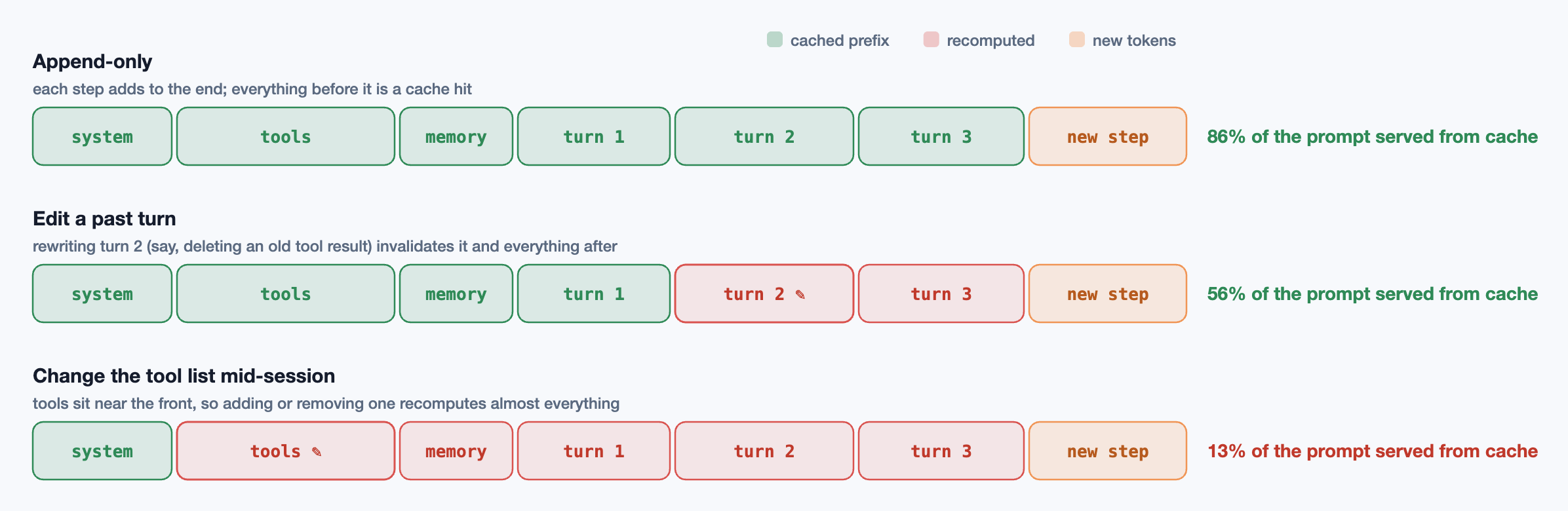
Manus call the KV-cache hit rate the single most important metric for a production agent, and the design rules follow directly from Fig. 4:
- Keep the prefix stable. No timestamps or session ids at the top of the system prompt. Put anything that changes at the end.
- Make the context append-only. Don’t rewrite or reorder earlier messages, and serialise tool results deterministically (a JSON object with keys in random order is a different prompt).
- Mask tools, don’t remove them. If a tool should be unavailable in some state, keep its definition and constrain the model’s choice at decoding time, rather than editing the tool list.
- Batch context edits. Clearing old tool results breaks the cache from that point on. Do it rarely and in bulk, during compaction, not a little at every step.
Compression and caching pull in opposite directions: one wants to edit the past, the other wants it frozen. The usual resolution is to let the context grow append-only for a long stretch, then compact once, accept one cache miss, and start a new append-only stretch.
Keeping a long task on track
The central question for any agent is: given a task, how does it keep executing it? A ten-step bug fix mostly takes care of itself. A two-hundred-step feature does not. The goal stated in the first message slides into the low-attention middle, the context fills with stale detail, and the model starts to drift: it solves a nearby problem, or declares victory early, or loops. The techniques that work all come down to one idea: keep the goal and the plan in the high-attention positions, and keep checking against reality.
1. An explicit plan, recited
Have the agent write a todo list before it starts and rewrite it as it goes: one item in progress, items marked done only after verification. The list is useful as a record, but its main value is recitation. Each rewrite puts the whole plan, goal included, at the end of the context, exactly where Fig. 2 says the attention is. Manus describe the same trick with a todo.md they rewrite throughout a task, and call it manipulating the model’s attention through recitation.
import type { Tool } from "./agent";

// The plan as a tool. Rewriting it every few steps is what keeps the goal near the end of the context.
type Todo = { content: string; status: "pending" | "in_progress" | "done" };
let todos: Todo[] = [];

export const todoTool: Tool = {
  name: "todo_write",
  description:
    "Replace the task list. Use it to plan before acting and update it after each step. " +
    "Exactly one item is in_progress at a time; mark items done only after verifying them.",
  run: async ({ items }: { items: Todo[] }) => {
    todos = items;
    return todos.map((t, i) => (i + 1) + ". [" + t.status + "] " + t.content).join("\n");
  },
};
2. Verification as the source of truth
A model’s belief that it is finished is a guess. Tests, type checks, linters, builds and screenshots are evidence. Good harnesses put verification inside the loop: after every edit, run the cheapest relevant check; before accepting “done”, run the full one, and if it fails, feed the failure back and continue (the verify step in the harness below). Hooks that block the agent from ending its turn while tests are red are a blunt but effective version of the same rule. The more objective the stop condition, the longer an agent can run without supervision.
3. Keep the errors
It is tempting to clean failed attempts out of the context. Don’t, at least not until compaction. A stack trace and the edit that caused it are exactly the evidence that stops the model from making the same edit again. Remove the failure and you invite the loop where the agent tries the same fix four times.
4. Externalise progress for long runs
For work that spans several context windows, or several sessions, write progress down in a form a fresh context can pick up: a progress file listing what is done, what is in flight and what is next; a structured feature list with pass or fail status; a commit after each verified step. A new session then starts by reading the progress file and git log, the way a developer coming back from holiday would, instead of trying to recover state from a summary of a summary.
5. Budgets and loop detection
Every loop needs a ceiling: a maximum number of steps, tokens or minutes, after which the agent stops and reports what it has. Cheap checks catch the common pathologies early: the same tool call with the same arguments three times, the same test failing after three different edits, a long run of reads with no edits. The right response is usually to stop and summarise for a human, not to retry harder.
Roles and orchestration
One agent with one context is the default, and it should be. It sees everything it has done, so its decisions stay consistent. Splitting work across several agents buys parallelism and clean contexts, at the cost of coordination. Anthropic’s “Building effective agents” separates workflows, where code fixes the sequence of LLM calls, from agents, where the model directs its own process, and describes the common patterns: prompt chaining, routing, parallelisation, orchestrator–workers and evaluator–optimiser.
In coding systems the roles usually look like this:
- Orchestrator / planner: holds the user’s goal, breaks it into tasks, assigns them, and integrates the results. It is the only agent that sees the whole picture.
- Explorers: read-only subagents that search and summarise (“how is auth wired?”). This is the safest and most valuable split, because reading is parallel by nature and the summaries are small.
- Implementers: make changes to a scoped part of the code, ideally in an isolated git worktree so parallel edits don’t collide.
- Testers and reviewers: an evaluator with a fresh context. A reviewer that didn’t write the code isn’t anchored on the author’s reasoning, which is the same reason human code review works.
Anthropic’s write-up of their multi-agent research system reports that a lead agent with parallel subagents beat a single agent by 90.2% on their internal research evaluation, and also that it used about 15 times the tokens of a chat. The gain came from breadth: many independent lines of inquiry, each in its own clean context. Cognition’s “Don’t Build Multi-Agents” makes the opposite case for writing code: every action carries implicit decisions, and two subagents building parts of the same feature in separate contexts will make conflicting ones. One picks a date format, the other picks another, and neither knows.
Both are right, and the reconciliation is a rule of thumb:
- Parallelise reading, serialise writing. Fan out exploration and research. Keep the decisions that must agree with each other in one context.
- Pass artifacts, not telephone. Subagents should return concrete, checkable outputs: file paths, line numbers, a diff, a failing test. Prose paraphrases of findings lose detail at every hand-off.
- Give each worker the decisions it needs. A task description should carry the constraints already chosen (the interface, the naming, the error-handling convention), not only the goal.
Plans as DAGs
Once there are several tasks with dependencies, the plan is a directed acyclic graph: “build the callback” depends on “explore the auth code” and “read the OAuth spec”; “run tests” depends on everything that changes code. Representing the plan as a DAG gives the orchestrator a scheduler for free. Any task whose dependencies are done can start, so independent tasks run in parallel, and the wall-clock time is set by the critical path, not the total amount of work.
Three properties make DAG orchestration work in practice:
- The graph is dynamic. A plan made before reading the code is a hypothesis. Failures, as in Fig. 5, and discoveries add, split or drop nodes. The orchestrator replans; it doesn’t just execute.
- Verification nodes are gates. Put checks where branches merge. A failure there tells you which upstream task to revisit, and nothing downstream runs on a broken base.
- Edges carry artifacts. What flows along an edge should be a file, a diff or a short structured report, so the downstream task’s context starts small and concrete.
// Run a plan as a DAG: start every task whose dependencies are done, up to N at once.
type Task = { id: string; deps: string[]; run: () => Promise<"ok" | { failed: string }> };

export async function runDag(
  tasks: Task[],
  workers = 3,
  replan: (id: string, why: string) => Task[], // what to add when a task fails
) {
  const done = new Set<string>();
  const running = new Map<string, Promise<void>>();
  let pending = [...tasks];

  while (pending.length || running.size) {
    const ready = pending.filter((t) => t.deps.every((d) => done.has(d)));
    for (const t of ready.slice(0, workers - running.size)) {
      pending = pending.filter((p) => p !== t);
      running.set(t.id, t.run().then((r) => {
        running.delete(t.id);
        if (r === "ok") done.add(t.id);
        // On failure the orchestrator extends the graph: say, a fix task and the same check again.
        else pending.push(...replan(t.id, r.failed));
      }));
    }
    if (running.size === 0 && ready.length === 0)
      throw new Error("Deadlock: a dependency can never finish.");
    await Promise.race(running.values());
  }
}
How agents fail
Drew Breunig’s catalogue of long-context failures (poisoning, distraction, confusion, clash) maps neatly onto agent behaviour. Add the failures specific to loops and you get a debugging table:
| Failure | What it looks like | Fix |
|---|---|---|
| Context poisoning | A wrong conclusion early on is treated as fact for the rest of the run | Verify claims with tools; let a fresh-context reviewer check |
| Context distraction | The agent repeats past actions instead of reasoning anew | Compact earlier; clear stale tool output |
| Context confusion | Irrelevant tools or files steer its choices | Fewer tools per step; select before you load |
| Context clash | Contradictory instructions or old and new code in the same window | Supersede explicitly; keep one source of truth on disk |
| Goal drift | Solves a nearby problem, or “improves” unrelated code | Recited todo list; scope stated in every task |
| Premature “done” | Stops with failing tests or a half-wired feature | Stop check in the harness: tests, types, todos |
| Doom loop | Same edit, same failure, again and again | Keep errors in context; repetition detector; step budget |
| Lost after compaction | Forgets a constraint the user gave early on | Constraints in a file; a compaction prompt that asks for them |
| Conflicting subagents | Parallel pieces that don’t fit together | Serialise writing; pass decisions down; integrate in one context |
A minimal harness
The loop, the stop check, output clipping and compaction fit in about seventy lines. The model and token counter are injected, so this works with any provider’s tool-calling API.
// A coding agent in one loop. The model decides; the harness executes, records and enforces.
type ToolCall = { id: string; name: string; input: Record<string, unknown> };
type Message =
  | { role: "user" | "assistant"; content: string; calls?: ToolCall[] }
  | { role: "tool"; callId: string; content: string };
type Model = (system: string, messages: Message[], tools: Tool[]) => Promise<{ text: string; calls: ToolCall[] }>;
export type Tool = { name: string; description: string; run: (input: any) => Promise<string> };

const MAX_STEPS = 60;
const COMPACT_AT = 0.8; // fraction of the window

export async function runAgent(task: string, model: Model, tools: Tool[], opts: {
  system: string;
  window: number;
  count: (messages: Message[]) => number;      // token counter for the provider
  verify: () => Promise<string | null>;        // e.g. run tests + typecheck; null means green
}) {
  let messages: Message[] = [{ role: "user", content: task }];

  for (let step = 0; step < MAX_STEPS; step++) {
    // Compress: near the limit, replace the history with a summary written by the model.
    if (opts.count(messages) > opts.window * COMPACT_AT) messages = await compact(model, opts.system, messages);

    const reply = await model(opts.system, messages, tools);
    messages.push({ role: "assistant", content: reply.text, calls: reply.calls });

    if (reply.calls.length === 0) {
      // The model thinks it is done. The harness checks before believing it.
      const failure = await opts.verify();
      if (failure === null) return reply.text;
      messages.push({ role: "user", content: "Verification failed. Fix this before finishing:\n" + clip(failure) });
      continue;
    }

    for (const call of reply.calls) {
      const tool = tools.find((t) => t.name === call.name);
      let result: string;
      try {
        result = tool ? await tool.run(call.input) : "Unknown tool: " + call.name;
      } catch (err) {
        // Keep errors in context: a failed attempt is evidence the model needs.
        result = "Error: " + String(err);
      }
      messages.push({ role: "tool", callId: call.id, content: clip(result) });
    }
  }
  throw new Error("Step budget exhausted; hand back to a human with the transcript.");
}

// Long outputs are cut, with a note saying how to get the rest, instead of flooding the window.
const clip = (s: string, max = 8000) =>
  s.length <= max ? s : s.slice(0, max) + "\n[... " + (s.length - max) + " chars cut; re-run with a narrower query]";

async function compact(model: Model, system: string, messages: Message[]): Promise<Message[]> {
  const keep = messages.slice(-6); // the most recent turns survive verbatim
  const { text } = await model(system, [
    ...messages.slice(0, -6),
    { role: "user", content:
      "Summarise this session for your future self: the goal, constraints, decisions and why, " +
      "what failed, files changed, and the exact next steps. Be specific; this replaces the history." },
  ], []);
  return [{ role: "user", content: "Summary of earlier work:\n" + text }, ...keep];
}
Everything that makes production agents good is an elaboration of these lines: better tools (an editor that lints, a search that ranks), permission checks before risky commands, a sandbox, prompt caching, subagents exposed as tools, and a great deal of evaluation.
Measuring agents
SWE-bench (Jimenez et al., 2023) is the standard public benchmark: 2,294 real GitHub issues from twelve Python repositories, each judged by whether the repository’s own tests pass after the agent’s patch. SWE-bench Verified is a 500-task subset that human annotators confirmed to be solvable and fairly tested. Terminal-Bench does the same for command-line tasks. They are useful for comparing models, but your codebase is not on them.
For your own agent, measure the things this article is about:
- Task success on a set of real tasks from your repository, checked by tests.
- Cost and steps per success: tokens, cache hit rate, wall-clock time. An agent that succeeds in 30 steps is better than one that needs 120, even at the same success rate.
- Failure taxonomy: read transcripts of failures and tag them with the table above. Most improvements come from fixing the most common failure, and it is usually context, not intelligence.
The pattern across all of this is that a coding agent is mostly an information-management system wrapped around a model. The model supplies judgement one step at a time. Everything that makes it look persistent, focused and organised, from the todo list to the compaction prompt to the graph of subagents, is the harness deciding what that judgement gets to see.
References
- Vaswani, A. et al. (2017). Attention Is All You Need. NeurIPS. arXiv:1706.03762
- Yao, S. et al. (2022). ReAct: Synergizing Reasoning and Acting in Language Models. arXiv:2210.03629
- Yang, J. et al. (2024). SWE-agent: Agent-Computer Interfaces Enable Automated Software Engineering. arXiv:2405.15793
- Jimenez, C. E. et al. (2023). SWE-bench: Can Language Models Resolve Real-World GitHub Issues? arXiv:2310.06770
- Liu, N. F. et al. (2023). Lost in the Middle: How Language Models Use Long Contexts. arXiv:2307.03172
- Hong, K., Troynikov, A. & Huber, J. (2025). Context Rot: How Increasing Input Tokens Impacts LLM Performance. Chroma Research. research.trychroma.com/context-rot
- Kwon, W. et al. (2023). Efficient Memory Management for Large Language Model Serving with PagedAttention. arXiv:2309.06180
- Anthropic (2024). Building effective agents. anthropic.com/engineering/building-effective-agents
- Anthropic (2025). How we built our multi-agent research system. anthropic.com/engineering/multi-agent-research-system
- Anthropic (2025). Effective context engineering for AI agents. anthropic.com/engineering/effective-context-engineering-for-ai-agents
- Ji, Y. (2025). Context Engineering for AI Agents: Lessons from Building Manus. manus.im/blog
- Yan, W. (2025). Don’t Build Multi-Agents. Cognition. cognition.ai/blog/dont-build-multi-agents
- Martin, L. (2025). Context Engineering for Agents. LangChain blog. blog.langchain.com
- Breunig, D. (2025). How Long Contexts Fail. dbreunig.com. dbreunig.com
Related reading
AI · 10 min read
Mixture-of-Experts: sparse models, routing and the cost of balance
How MoE layers route each token to a few experts: top-k gating, why routers collapse and how load-balancing losses and bias terms prevent it, expert capacity and dropped tokens, all-to-all communication, and total versus active parameters.
AI · 23 min read
Retrieval-Augmented Generation, from first principles
How RAG actually works: chunking, embeddings and the geometry of similarity, HNSW, hybrid search with BM25 and RRF, reranking, prompt assembly, evaluation, and the ways it fails.
AI · 9 min read
From RLHF to DPO: the maths of preference training
Bradley–Terry reward models, PPO with a KL penalty, the closed-form optimum that lets DPO drop the reward model, reward hacking, and GRPO with verifiable rewards for reasoning models.